
Learning
Think first, then check.
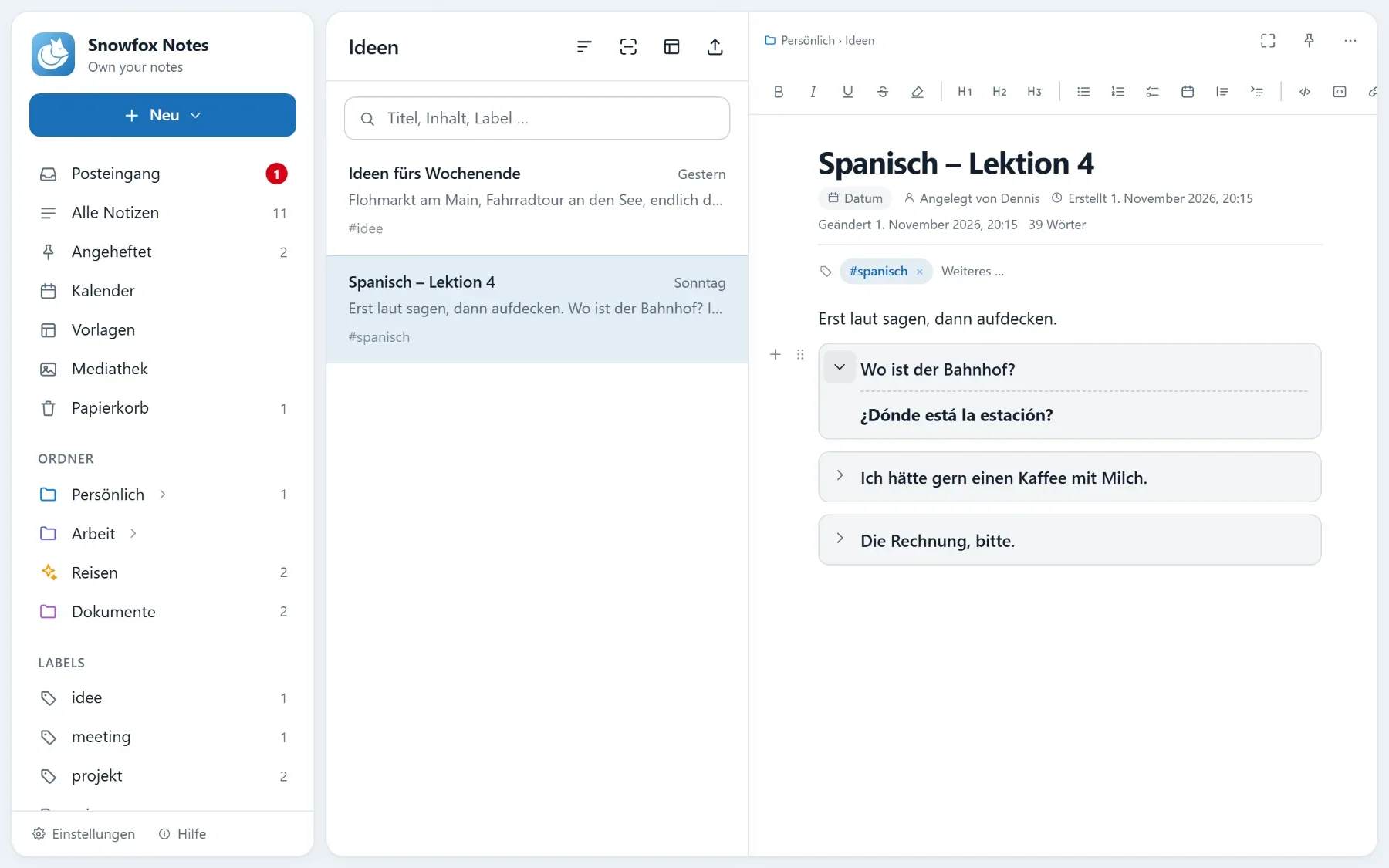
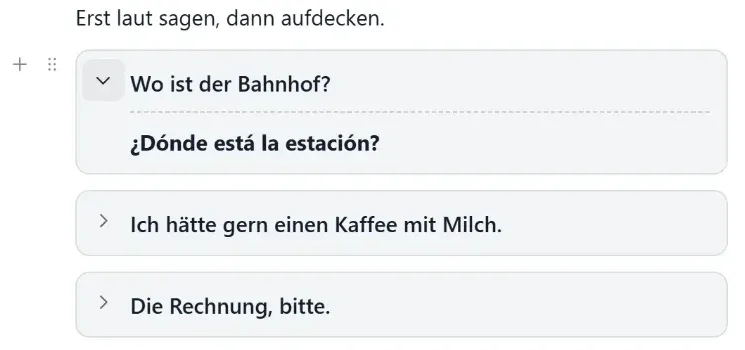
Reveal blocks work as flashcards: the question stays visible, the answer hidden until you click. That’s how you learn with your own notes.
Reveal blocks
Flashcards, right in your note.
A block has a visible line – a question, say – and below it a hidden part, the answer.
Flashcards
Next time you open it, everything’s closed again.
Add a reveal block via “/” or the toolbar. You can tuck away solutions or long details the same way.
- Revealing doesn’t change the note: open it again and everything’s hidden – for others reading it too
- In the note list, the preview gives no answers away
- Search still finds the answers
Learning templates
Five templates for learning.
They come with the app, in German and English – change them as you like.
Flashcards
Question on top, answer hidden. Plus reviews in the calendar: tomorrow, in three days, in one week and in three weeks.
Vocabulary
A lesson to test yourself on: words and sentences with hidden translations, the hard ones collected, reviews in the calendar.
Study note
For a lecture, course or book chapter: notes, questions from them with hidden answers, a summary.
Exam preparation
A folder up to the exam: a three-week study plan with dates, flashcards per topic, terms at a glance and a list of mistakes.
Book note
What’s in a book: the ideas, the quotes, what you take away – and questions so you still know it later.
Reviews
Your next review is in the calendar.
Learning templates add it as a task. You see it on the day it’s due and tick it off there.
If you connect an AI
“Quiz me on the vocabulary from lesson 4.”
If you connect an AI via MCP, it can quiz you or make flashcards from a text.
How to
Three things to know
-
1. Add a block
Type “/” at the start of a line and choose the reveal block – or use the toolbar. The question goes on top, the answer below.
-
2. Start from a template
Open Templates in the sidebar and pick the learning category under Available. Add to my templates takes it over, then you create a note from it.
-
3. Review
The dates are tasks in the calendar. Open the note, reveal the answers and tick off the review.
Questions
Questions about learning
Does the note remember what I revealed?
No. Revealing doesn’t change the note: open it again and everything’s hidden – for others reading it too.
How do I plan reviews?
The learning templates add them as tasks with dates – the flashcards template, for example, for tomorrow, in three days, in one week and in three weeks. You can also give any task a date yourself.
Does search find the hidden answers?
Yes. In the note list the preview gives no answers away, but search still finds them.
Curious? Give it a try.
Snowfox Notes is free and open source. Download it and put it on your own web space – or let us host it for you.
Runs on any web space with PHP 8.4. No SSH needed.